
University space management is the work of making staff offices, meeting rooms and shared areas in higher education fit how people now work. Hybrid work has changed the sector as much as any other, and universities face five recurring challenges: downsizing staff offices, understanding space usage, scheduling without conflicts, integrating technology and protecting data.
Each challenge has a practical answer in space management software, which gives administrators the data and booking tools to get smarter about how physical spaces and desks are used. Kadence first set out these challenges and solutions in May 2024. Kadence’s higher education page covers how the platform supports universities today.
Why is space management harder for higher education?
Higher education organizations manage a mix of staff offices, administrative buildings, meeting rooms and specialist spaces, and hybrid work has made demand for them less predictable. The core task is creating an environment that is both functional and enjoyable for employees while controlling the cost of space that is often unevenly used.
As workforces and spaces change, the question for managers and administrators is how to balance the demands of a modern workforce with the practicalities of managing space under a hybrid model. The five challenges below are where that balance is usually hardest.
1. How can universities downsize staff offices?
Universities can downsize staff offices by moving from permanent individual offices to bookable shared desks. A desk booking tool requires staff to book before coming in, which shows who is in the office and when. That evidence tells administrators where and how to downsize, and frees space for other uses.
As an organization evolves, there is a growing need to reconfigure traditional office layouts into collaborative, multipurpose spaces and to save on real estate costs. Reducing staff offices and desk space makes room for amenities such as study areas, meeting rooms and recreational facilities, and it matters as much as cutting unnecessary space altogether. Managing that transition is hard without a clear picture of how the space is used.
The solution: implement a desk booking management tool. Desk booking supports desk hoteling, a model in which staff reserve shared desks instead of keeping permanent individual offices. It keeps discipline by requiring a booking before each office day, and the resulting data shows where space can be released.
2. How do you understand how campus office space is used?
You understand space usage with analytics that break down how each space is used through the day, the week and the semester. Those patterns show which rooms and areas sit empty while others are overcrowded, so administrators can make informed decisions that benefit everyone, including switching off unused areas to save energy.
University offices often have areas or meeting rooms that are rarely used while other parts of administrative buildings are constantly overcrowded. That uneven distribution wastes resources and frustrates employees who cannot find the spaces they need. Underused spaces often come from poor scheduling and planning. Large conference rooms get booked for small meetings, leaving smaller, more suitable rooms empty. Areas set aside for specific purposes, such as archives or IT rooms, are not repurposed when they are not in use. This inefficiency affects energy consumption and maintenance costs as well as the space itself.
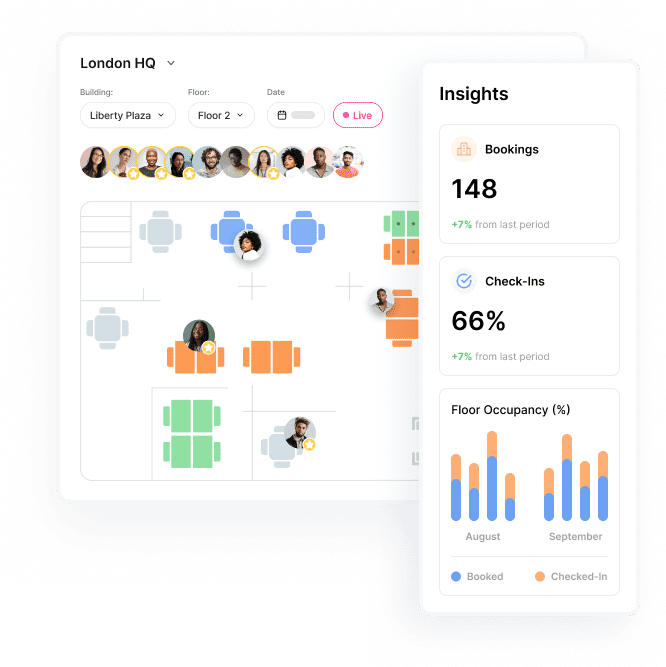
The solution: choose space management tools with built-in data and analytics on utilization patterns. With a breakdown of how spaces are used, administrators can switch off certain areas when they are not in use to save on energy bills, or group desks differently to distribute employees more efficiently.
3. How do you stop scheduling and booking conflicts?
You stop scheduling conflicts by replacing shared spreadsheets with a centralized booking platform that shows, at a glance, which workspaces are free. When everyone books from the same system, double bookings and unused reservations become visible, and people can find and reserve the space they need without running into each other.
Most people know the frustration of arriving to find someone already at their favorite desk, even after highlighting the right cell in a shared Google Sheet. Scheduling conflicts come from the complexity of organizing people and their movements, and a shared sheet quickly becomes confusing. Desks in higher education offices get double-booked, or a conference room is reserved on several days but never used. Conflicts lead to last-minute changes, cancellations and frustration.
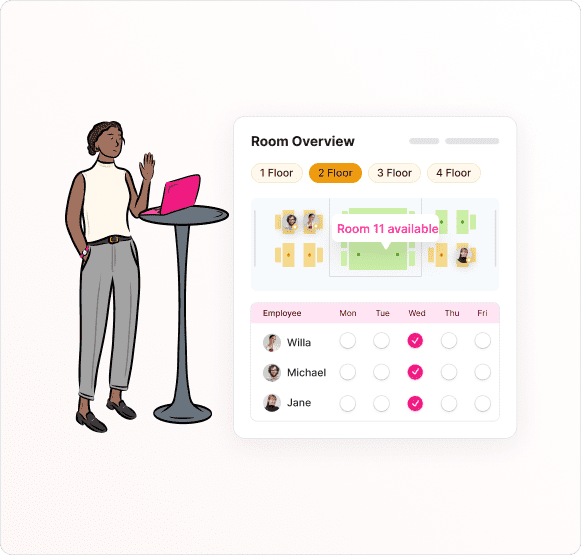
The solution: space management tools are built to organize people and spaces, so they include room and desk scheduling that shows when and where workspaces are available. A centralized platform streamlines booking for everyone. In May 2024, Kadence also pointed to AI-driven Smart Suggestions, automated prompts that help avoid scheduling conflicts and suggest bookings that make sense for each person.
4. How do you integrate new tools with legacy campus systems?
You integrate new tools by choosing a platform that manages room bookings, resource allocation and user access from one interface and connects to the systems staff already use. Fewer tools means less complexity, and an intuitive interface makes the tool easy for first-time users.
Integrating new technology can look daunting. Existing infrastructure is often complex, with legacy systems and software that are not easily compatible with modern solutions. A university might run separate systems for room bookings, resource management and user access, all of which need to stay in sync. Poor integration creates inefficiency, data silos and a lot of headaches. The pace of technological change adds pressure to keep up, and ongoing updates can be resource-intensive and disruptive. The result is often a patchwork of tools that do not talk to each other and make space management harder.
The solution: simplify. Space management tools should reduce complexity, not add to it. A platform that handles room bookings, resource allocation and user access from a single interface lets the organization rely on fewer tools. It should also be easy to fit into the existing tech stack. In May 2024, Kadence described an out-of-the-box approach that integrates with Microsoft Teams, Google Workspace or Workday, with a user experience that is easy for first-time users to navigate.
5. What security and privacy standards should university space management software meet?
University space management software should meet recognized security standards and encrypt data both in transit and at rest. In May 2024, Kadence advised looking for SOC 2 compliance and Cyber Essentials certification. These standards protect staff personal data and campus information from unauthorized access and breaches.
Data breaches and privacy concerns are a constant risk. Higher education organizations are under pressure to protect sensitive personal data about employees, as well as information about the campus and facilities. Without robust security, systems are vulnerable to unauthorized access, data breaches and other threats that can compromise the integrity of the organization and the safety of its community.
The solution: choose space management software with strong security infrastructure. The platform should be SOC 2 compliant, maintain Cyber Essentials certification and encrypt data in transit and at rest. Kadence’s security page sets out its current standards. Partnering with a provider that upholds high data and privacy standards gives peace of mind when adding a new tool to university workflows.
How does Kadence support higher education space management?
Kadence combines data analytics, flexible scheduling, integrated technology and security measures to help higher education organizations manage their spaces. It addresses unused space, scheduling conflicts, technology integration and data protection in one platform, so staff get a productive environment and administrators get evidence for space decisions.
To see how one university has approached it, read the University of Exeter customer story.
Frequently asked questions
What is university space management software?
It is software that helps a university plan, book and measure how its staff offices, meeting rooms and shared spaces are used. It typically combines desk and room booking with analytics, so administrators can see usage patterns and decide where to downsize or repurpose space.
How does desk hoteling help universities reduce office space?
Desk hoteling replaces permanent individual offices with shared desks that staff book before coming in. The booking data shows who uses the office and when, which gives administrators the evidence to downsize staff offices and turn freed space into study areas, meeting rooms or other amenities.
How can universities cut energy costs with space data?
Analytics show which areas and rooms go unused through the day, week or semester. Administrators can then switch off those areas when they are not in use to save on energy bills, or group desks so people use fewer spaces more fully.
Which integrations matter for campus space management?
Integrations with the tools staff already use. In May 2024, Kadence described integrations with Microsoft Teams, Google Workspace and Workday, so booking fits into existing workflows instead of adding another separate system.