
Workplace Occupancy
Office occupancy data you can trust.
No-shows, walk-ins and people who never book leave holes in your numbers. Kadence Sense checks people in from signals you already run, so attendance reports hold up with leadership.
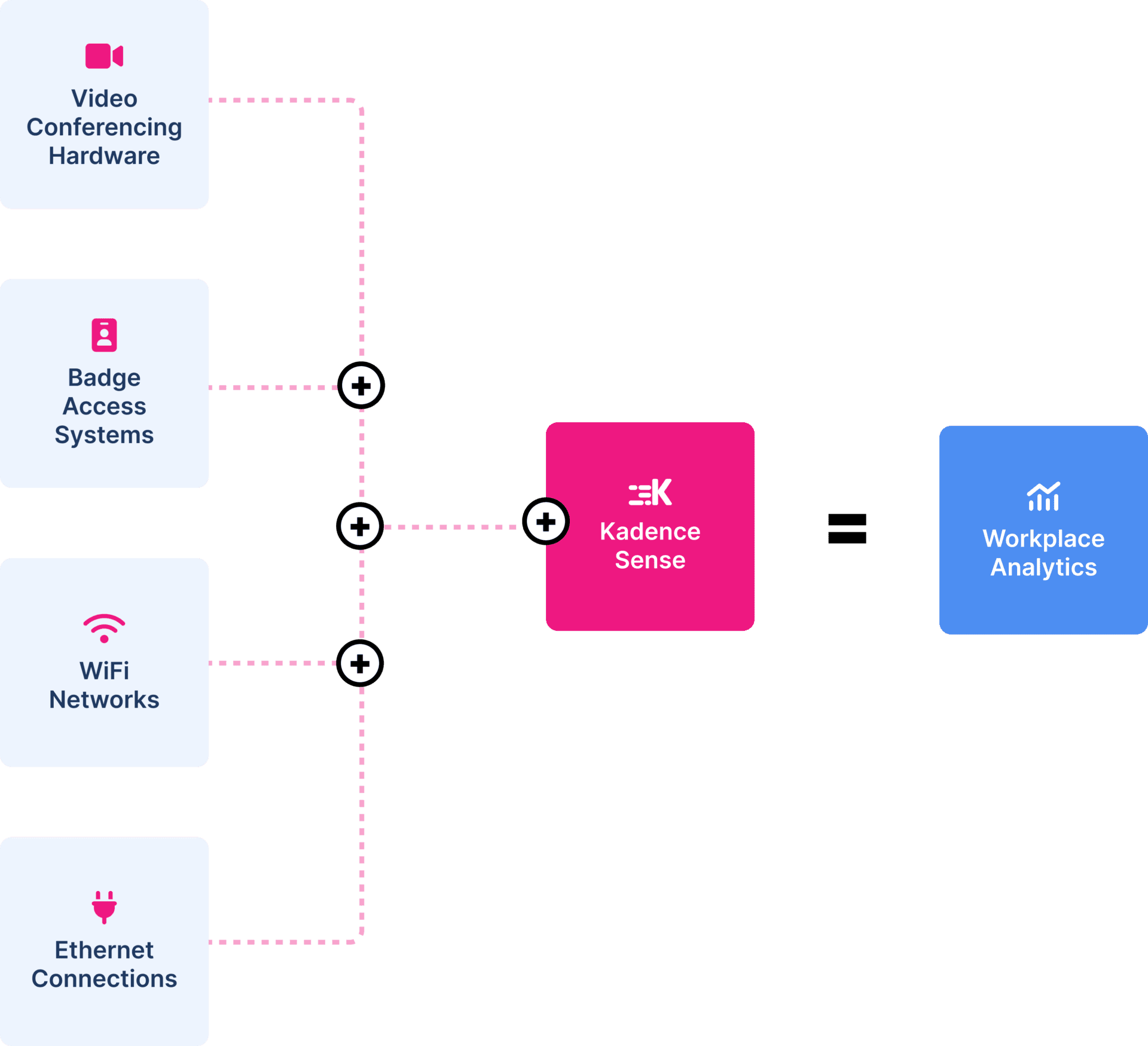
Illustrative video, badge, Wi-Fi and Ethernet signals converge in Kadence Sense to populate weekly workplace analytics at 66% occupancy without hardware sensors.
Why occupancy data breaks, and how Kadence Sense fixes it
Trusted Occupancy Data
Bookings show who planned to come in, not who came
Booked desks sit empty. People walk in without booking. Badge exports and HR lists rarely match, so someone spends days reconciling spreadsheets and leaders still question the result. Kadence Sense combines bookings, badge data, Wi-Fi and check-ins into sensorless occupancy, so you know what is actually happening in your offices.
- No-shows: Kadence reports bookings that nobody checked in to, and auto-release frees the space.
- Walk-ins: Automatic Bookings creates a booking when someone arrives without one.
- People without the agent: check-ins from kiosks, room displays, badge data or the public API fill the gaps.
Automated Check-In
Check people in from the signals you already have
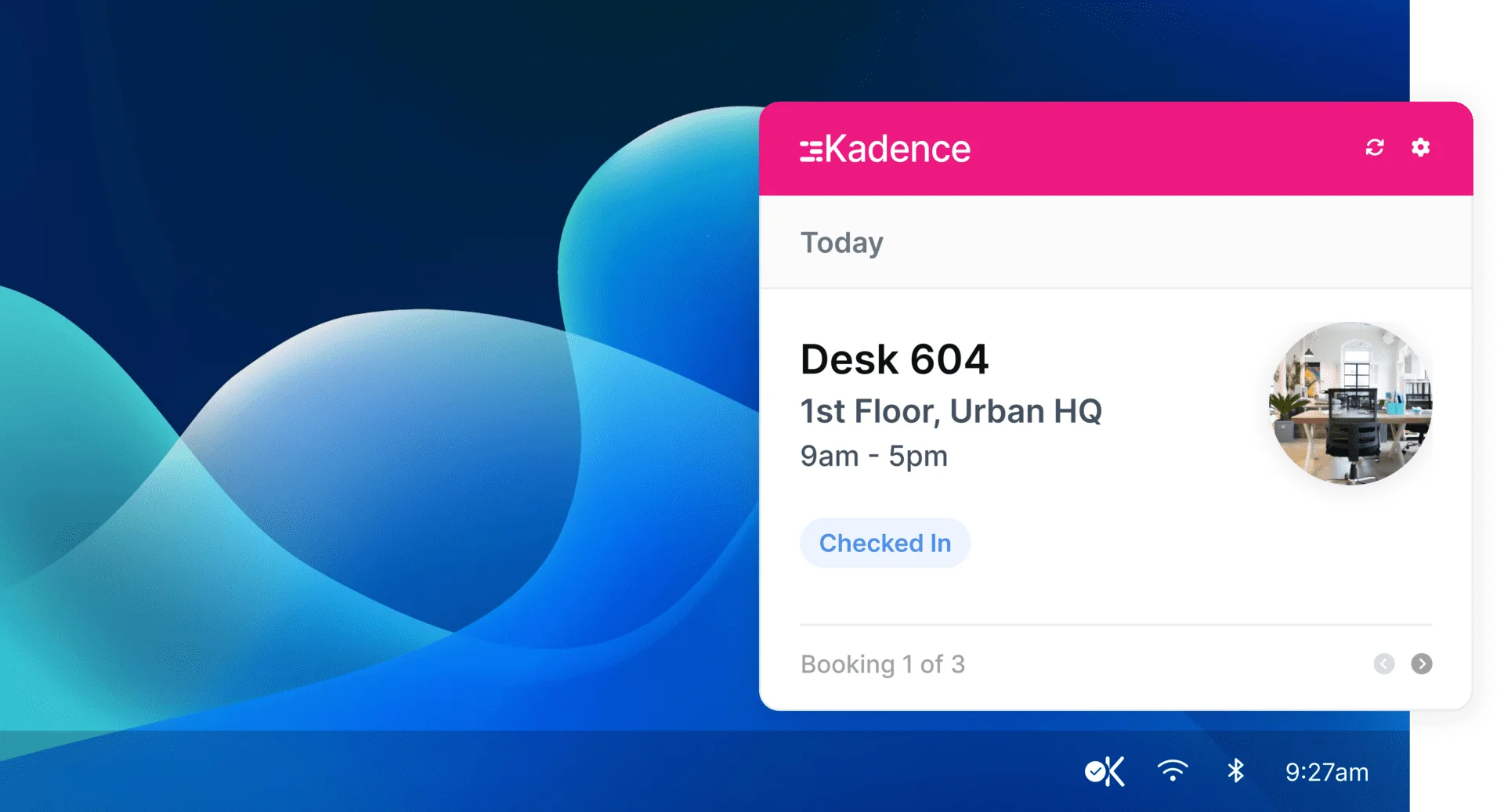
The Kadence Agent runs on Windows, Mac, ChromeOS and Linux. It detects the office network and checks people in, with no sensors to install and nothing for employees to tap. Enhanced Network Detection adds floor-level presence that works with VPNs.
- Auto Login: the agent signs in with Microsoft Entra or Okta, silently on Windows with Entra, so employees have nothing to set up.
- Your rules: choose whether lockers and parking count toward attendance.
Attendance Tracking
Report on hybrid policy adherence with confidence
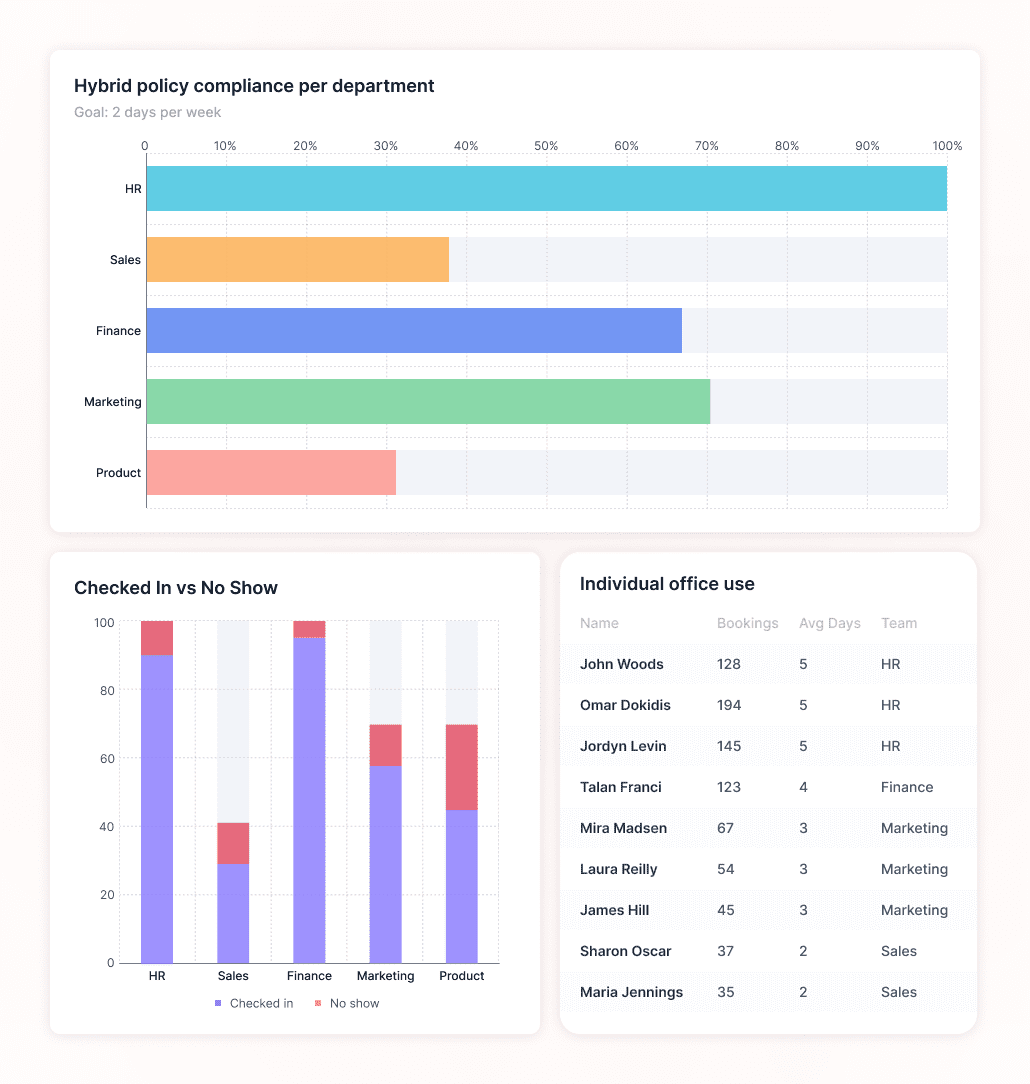
When check-ins come from real presence, attendance reports show who came in, not just who booked. Track attendance against your policy by team, department or location, and refine the policy where it is not working. Insights Plus adds custom dashboards, including policy compliance reporting.
- Team Attendance – Compare in-office attendance across teams, and track actual attendance vs. expected presence.
- Hybrid Preferences – Identify preferred in-office days by department and region.
From Data To Decisions
Occupancy data that feeds your space plans
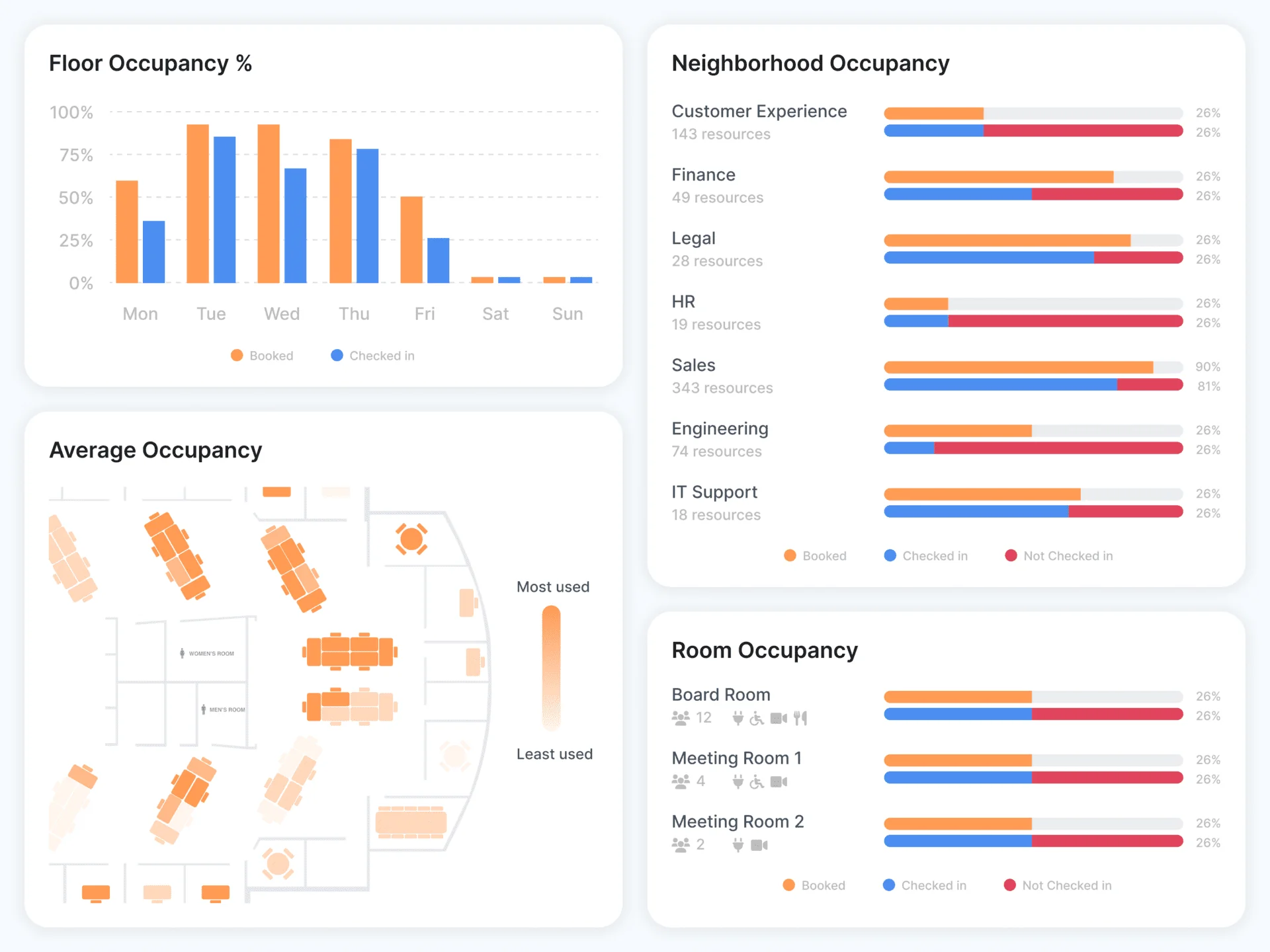
See attendance, occupancy, no-shows and heatmaps for every location in Workplace Insights, and export the data when you need it. When you are ready to plan, SpaceOps uses the same attendance and occupancy data to build stack plans and compare scenarios.
Kadence comes with
- Interactive Floor Plans: forecast office usage and space utilization ahead of time.
- Data Export: prioritize real estate spend by reporting on space utilization.
- Customized Seating: create, edit and manage office neighborhoods and assigned desks.
- Dedicated Customer Support: our customer experience team is always around to help.
- Give Instant Feedback: send feedback to Kadence from inside the app.
- Auto-Release: free up no-show bookings automatically to reduce wasted space.
- Guest And Onsite Booking: invite guests and get notified when they arrive.
- Capacity Limits: set the occupancy limit for each floor on any day.
The terms behind occupancy data you can trust
Kadence measures office occupancy from presence data, not bookings alone. The Kadence Agent, network detection, kiosks, room displays, badge data and the public API each check a person in. Workplace Insights then reports attendance, occupancy and no-shows by building, floor and team, and Insights Plus turns them into leadership dashboards.
- Presence data: the record of who was in the building and when, from network, badge and check-in signals.
- Desktop presence agent: a laptop app that detects the office network and checks people in automatically.
- Walk-in usage: desks and rooms used without a booking. If you miss it, reports undercount demand.
- Occupancy rate: the share of desks, rooms or floor area in use, at a point in time or on average.
- Multi-source occupancy: combining several signals so no single source has to be complete.
- Occupancy confidence score: how far you can rely on a reading, based on how many sources agree.
- Hybrid policy compliance: whether people and teams meet your in-office expectations over many weeks.
Occupancy evidence in practice
Karger measured occupancy through desk booking and check-in, saw it hold at 30 to 40%, and moved from fixed desks to one and a half floors: an 80% smaller footprint. Read the Karger story
Denbighshire County Council replaced days of manual reporting with Insights Plus dashboards, and used the evidence to right-size its estate and its hybrid policy. Read the Denbighshire story
FAQ
Frequently asked questions
What is occupancy tracking software?
Occupancy tracking software records how many people use an office, and which floors, desks and rooms they use, over time. Kadence does this with Kadence Sense, which checks people in from the Kadence Agent, office network detection, kiosks, room displays, badge data or the API. Workplace Insights then reports attendance, occupancy and no-shows by building, floor and team.
How does Kadence track office occupancy without sensors?
The Kadence Agent is a desktop app for Windows, Mac, ChromeOS and Linux. When a laptop joins the office network, the agent checks that person in. Enhanced Network Detection adds floor-level presence and works with VPNs. If someone arrives without a booking, Automatic Bookings creates one, so walk-ins count too. You do not need to install sensors.
Why is our occupancy data hard to trust?
Most occupancy data comes from one source, and each source misses something. Bookings count no-shows as use and miss walk-ins. Badge data shows who entered the building, not which floor they used. Manual check-ins depend on people remembering. Kadence checks people in from several signals, so a gap in one source does not leave a gap in your report. See multi-source occupancy.
Can Kadence use our badge data?
Yes. Badge data can check people in to Kadence, alongside the Kadence Agent, kiosks, room displays and the public API. This helps you count people who do not run the agent. Outbound webhooks can also send Kadence events to your security or badge tools in real time.
How do we get the Kadence Agent to everyone?
The Kadence Agent runs on Windows, Mac, ChromeOS and Linux. On Windows and Mac, Agent Auto Login signs it in with Microsoft Entra or Okta, silently on Windows with Entra, so employees have nothing to set up. For anyone without it, check-ins from kiosks, room displays, badge data or the API still count toward occupancy.
Can we report on hybrid policy compliance with Kadence?
Yes. Workplace Insights shows attendance by team, department and location. Insights Plus adds custom dashboards, including policy compliance reporting against your in-office goal. Because attendance comes from check-ins rather than bookings alone, reports show who came in, not only who planned to. Insights Plus is part of WorkOps Pro or available as an add-on.
Is occupancy tracking with Kadence private?
Kadence records check-ins to measure attendance and occupancy. Employees can turn on incognito mode to hide their location from colleagues. Admins decide how long personal data is kept, and can choose whether lockers and parking count toward attendance. Visit our security page for more on how Kadence protects data.
What is the difference between occupancy and utilization?
Occupancy is the share of space in use at a given time. Utilization is the share of capacity people actually use over a period, such as the hours a desk is in use each week. Kadence reports both in Workplace Insights, from check-ins rather than bookings alone. See occupancy vs utilization for worked examples.
Do we need occupancy planning software as well?
Occupancy tracking tells you how space is used today. Occupancy planning uses that data to decide what to change, such as where teams sit or whether to give up a floor. Kadence SpaceOps builds stack plans and compares scenarios from the same attendance and occupancy data. See space management and scenario planning.
Explore more
Next step
Start Working Smarter With Kadence
Book a demo, and see Kadence in action. Find out how we can help create smarter, more productive workplace for your people.