

Desk hoteling only works with accurate occupancy data: you need to know who actually used each desk and when. That data, captured by a check-in every time someone arrives at a reserved desk, is what turns a shared-desk policy into space you can plan, clean, heat and right-size with confidence.
Kadence published this argument in February 2021, as organizations prepared to return to offices after Covid. Employees expected a safe and sanitized office, and many wanted to keep working remotely for at least some of the time. Cutting real estate was a likely step to protect the bottom line, so workplace leaders and space planners had to make the most of the space they kept. Desk hoteling looked like the answer, but only if they knew who checked in and when.
What is desk hoteling, and why does it need occupancy data?
Desk hoteling is a shared-desk model in which employees reserve a desk for the time they need it instead of keeping a permanent one. It needs occupancy data because a reservation alone does not show whether the desk was used. Check-in data confirms use, so the space can be planned around real demand.
The glossary explains the difference between hot desking and hoteling. Occupancy data is the record of how people actually use a space over time. The key ingredient for getting the most out of desk hoteling is accurate occupancy data. A digital desk booking process that makes it easy to check in to a reservation every time gives you insights to drive efficiencies, match resources with demand and support productivity.
Why does a check-in matter more than a desk reservation?
A check-in matters because it tells you whether a booking was used at all. A reservation shows intent; a check-in confirms that a named person used a specific desk, when and for how long. Without it, a hoteling program cannot tell real demand from empty bookings.
Occupancy data reveals how employees interact with the office. In 2021 this mattered more than ever, because many businesses had reduced their real estate and resources, and demand from employees who want to use the office to collaborate could arrive at any time. Desk scheduling systems such as Kadence deliver hyperlocal data: a detailed breakdown of how and when space is used. If you secure the check-in every time, you know exactly when a desk was used, who used it and for how long. The same data underpins how you measure desk utilization.
How does occupancy data help you manage the workplace?
Occupancy data helps in four practical ways: it shows where space is underused, it informs cleaning schedules, it reveals how teams work together, and it guides energy use. Each turns check-in records into a decision about space, services or cost.
Efficient space planning
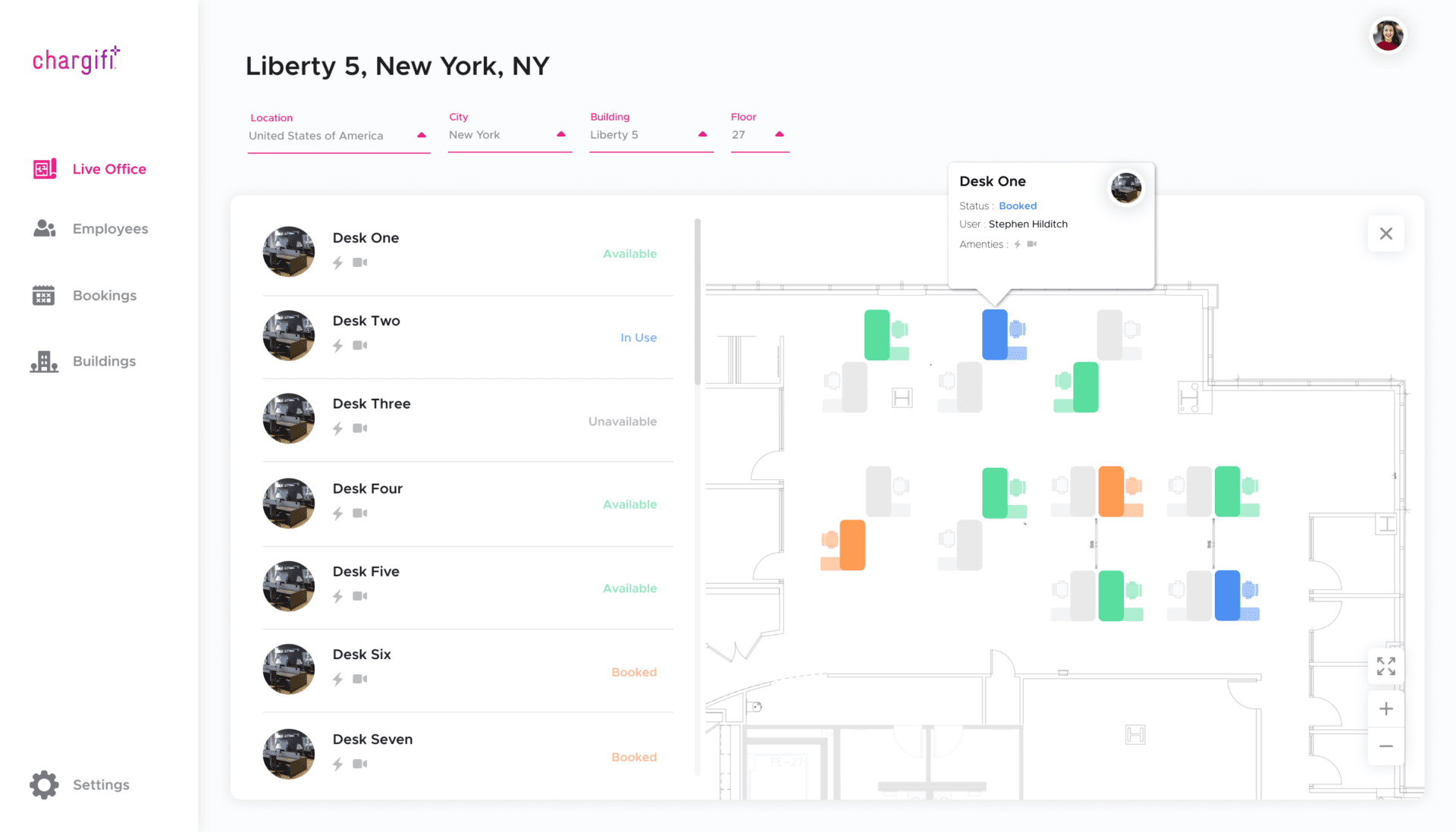
Occupancy data shows how intensively each space is used over time. Underused areas are an obvious opportunity for cost savings. The data also helps with office configuration. Perhaps a cluster of desks near a window is always full while a gloomier part of the office gets no bookings. You can see that pattern in the data and fix it. To go further, feed office occupancy data into Building Information Modeling (BIM) systems, the digital building models used for space planning and building design.
Cleaning schedules based on data
In a desk hoteling environment, a digital check-in process tells cleaning teams which desks were used. In 2021, the priority was making sure desks were sanitized between users: a desk was not released until it had been cleaned and prepared for the next person. Desk turnover data helps you manage cleaning schedules and plan resources. At the time, the same records also made contact tracing straightforward, because they showed the exact desks individuals used and when.
Analytics for team cadence and productivity
Data shows how different teams interact in the office and how people use different office neighborhoods, which are zones set aside for particular teams or activities. You can then plan facilities to support productivity and find the right business cadence. If certain teams need specific equipment or like to sit together at a regular time each week, you can plan space and equipment so it is available when and where they need it.
Data-driven energy use
Occupancy data shows when and where your highest energy demands are, so you can manage heating, air conditioning and lighting to match. Optimizing the energy efficiency of the office helps the planet, improves employee comfort and reduces cost.
How can you collect occupancy data?
The two main ways to collect occupancy data are occupancy sensors and desk booking software with check-in. Sensors count presence in the background. Desk booking software records which desks are used, for how long and by whom, which is the most valuable data for a hoteling program.
Occupancy sensors
Occupancy sensors count how many people are in a space, or how often a desk is used, using technologies such as ultrasound and infrared that detect movement. They do not tell you who is using the space, or whether it is the person who made the booking. Employees do not interact with sensors or get any value from them; the sensors just count in the background.
Desk booking software with check-in
Desk booking software records desk check-ins, so you discover which desks are used, for how long and by whom. The most valuable fact to capture is that an identified person has checked in to a reservation. That gives far deeper insight than a headcount. You begin to understand the cadence of office use and can plan spaces that support productivity, efficiency and comfort. You can also give something back to employees when they check in, as the next section explains.
What makes a desk hoteling check-in process work?
A check-in process works when it is easier to use than to skip. Put user experience at the center: if the booking software is overcomplicated, clunky or glitchy, people will not use it and you will never get the data. Then add features that improve people’s working lives, so checking in becomes part of their routine.
Useful features include the option to book space close to colleagues and wayfinding that helps people find their booked desk. In February 2021, Kadence described the process in three steps.
1. Desk booking and arrival
An employee reserves a desk, ideally in an easy-to-use app such as the Kadence workplace mobile app. They can check availability and book on a smartphone while on the move, or on a desktop while planning their schedule. When they arrive, the app detects their presence, shows the booked desk location and gives simple directions to the correct floor, office and desk.
Check-in prompts remind them to check in. If they do not, the central system is alerted, which makes it easy to identify no-shows and release the desk remotely. Other people who want to work in the office then have more desks to choose from.
2. Making desk availability visible
It is reassuring and helpful for employees to see at a glance which desks are available. In 2021, with social distancing in place, a good booking system could mark desks as unavailable on the floor plan in the app, and keep a desk unavailable after use until it had been cleaned. A smart system used occupancy data to alert cleaning staff automatically, so they could prepare the desk for the next person quickly.
3. Touchless check-in
Checking in through the mobile app, without touching shared equipment, gave employees control and the reassurance that they were keeping themselves and others safe.
How does an occupancy data layer help you plan ahead?
When you run desk hoteling through a cloud-based booking and scheduling system, you get an accurate occupancy data layer. It lets you respond in real time to changing conditions and make planning decisions based on evidence, so the office stays agile as hybrid attendance changes.
With that data, you can get the most out of desks and spaces, support productivity and meet the needs of a hybrid workforce moving between remote and office work. The workplace analytics metrics guide explains which measures to track from this data today.
Frequently asked questions
What is the difference between desk hoteling and hot desking?
Both remove permanent desks. In desk hoteling, employees reserve a desk in advance for the time they need it. In hot desking, people typically take whichever desk is free when they arrive. Reservations plus check-ins give hoteling the more reliable occupancy data.
Why do occupancy sensors fall short for desk hoteling?
Sensors count movement, so they show how many people are in a space or how often a desk is used. They cannot show who used a desk or whether that person made the booking, and employees get nothing back from them.
What happens when someone books a desk but does not check in?
The booking system flags the missed check-in as a no-show. The desk can then be released remotely and returned to the pool, so other people who want to work in the office have more desks to choose from.
How does occupancy data reduce costs?
It shows how intensively each space is used over time. Underused areas become candidates for cost savings, and knowing when and where demand peaks lets you match heating, air conditioning and lighting to actual use.